
Everything it takes to run a rental business.
Quoting, booking, payments, delivery, and follow-up, automated by an assistant that knows your inventory.
An assistant that quotes like your best employee
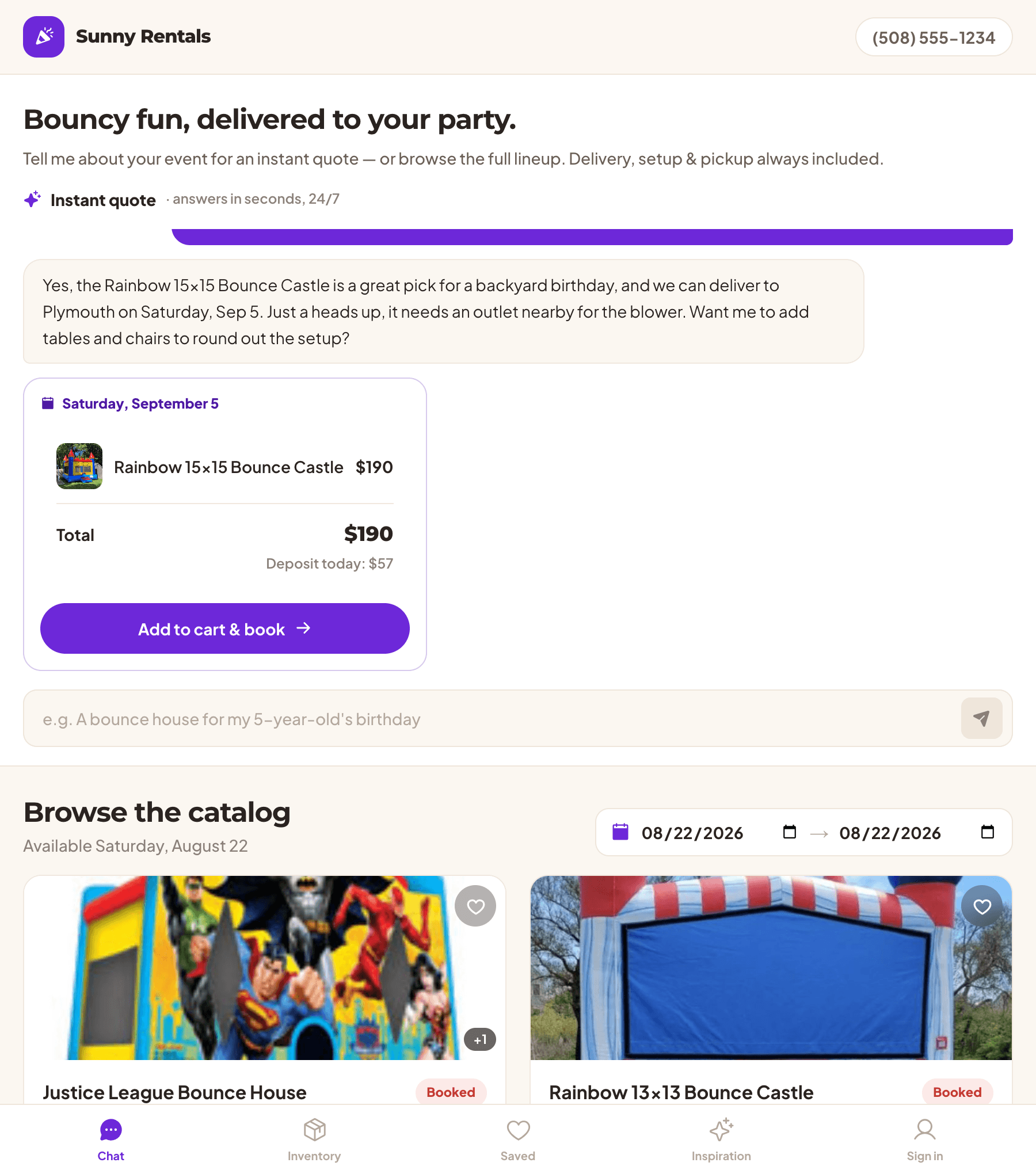
Customers ask in plain language and get a real, bookable quote priced from your own catalog.
Your prices, not a guess. Every quote is calculated from your live catalog, your rates, your tax setup, and your delivery pricing. The assistant explains the number; the system computes it, so it can never invent a price you don't charge.
It knows your actual constraints. Your service area, operating days, delivery windows, blackout dates, minimum lead time, deposit terms, and active promos are assembled from your settings on every conversation. So it won't promise a closed Sunday, a blacked-out weekend, a same-day booking inside your lead time, or delivery two towns outside your radius.
Brief it in your own words. Tell it how you talk, your house rules, and the safety points that matter for your equipment. The conduct that matters everywhere is built in: safety before the sale, no invented discounts, escalate rather than guess, and take no for an answer.
It knows when to get you. Past your auto-quote limit or off the map, it stops quoting, captures the lead, alerts you, and tells the customer a human is picking it up. Never a dead end, never a wrong number.
A quote you can book. The quote is a live, bookable card, so an answered question turns into a paid reservation without a callback.
Every request, in one inbox, answered first
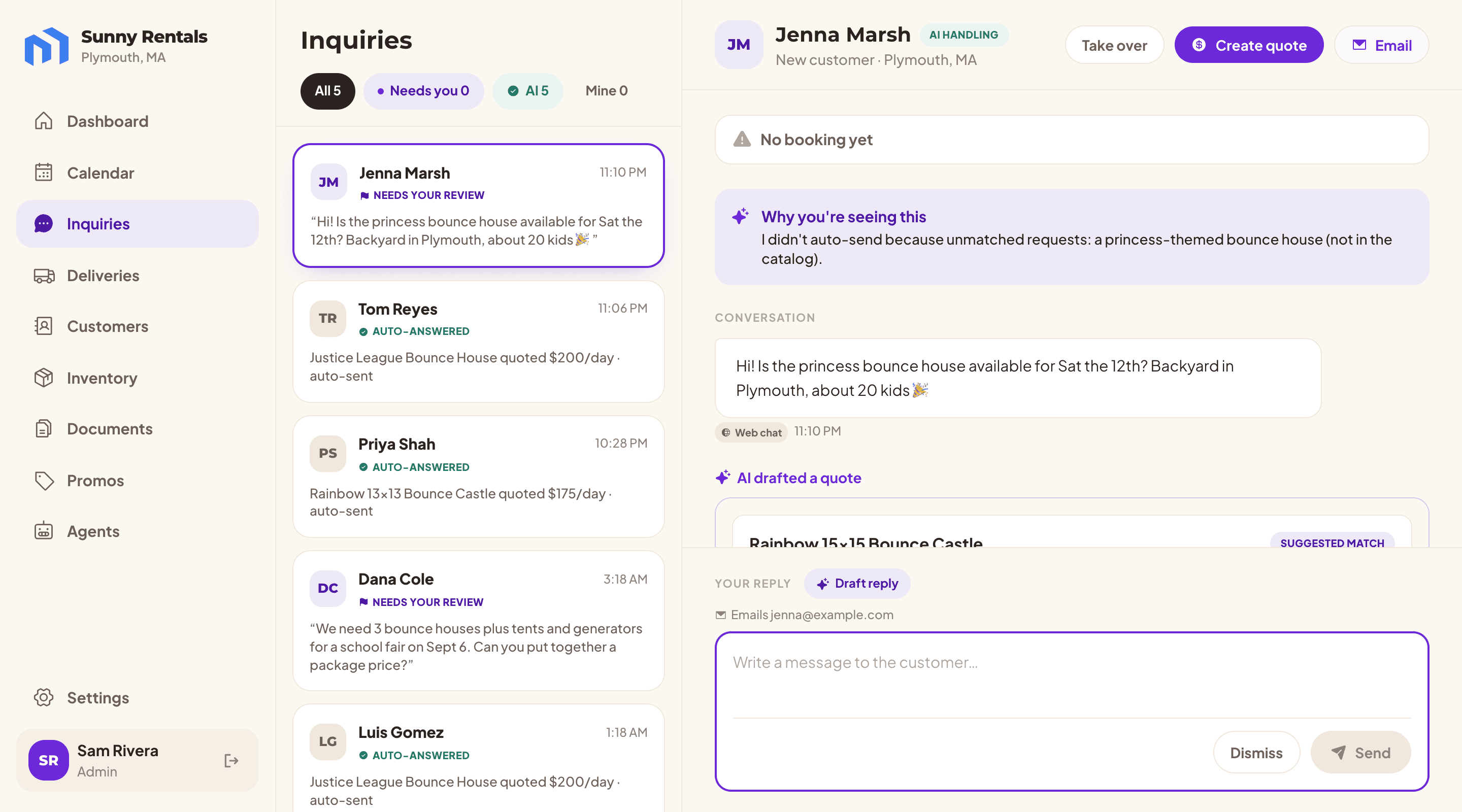
Web chat and email land in one thread. The AI replies immediately. You step in whenever you want.
Nobody waits
The assistant answers the moment a request arrives, at 11pm on a Saturday or while you're carrying a slide across a lawn. Customers book whoever replies first, and now that's you.
One thread per customer
Web chat and email replies thread into the same conversation with full history, so a returning question doesn't start from nothing.
Hand off in both directions
Take over a thread and the AI steps back. Hand it back and it picks up where you left off. While you're driving the conversation it stays on as a copilot and drafts the next reply for you to send or edit.
Live, and labelled
Messages stream in without a refresh, each tagged with the channel it came from, and one person who both texts and emails is recognized as one person.
Did it convert?
Every inquiry carries its outcome, whether it booked, started a checkout, or went nowhere yet, with the amount and a link to the booking. Even the threads the AI handled without you are measurable.
A booking page your customers actually finish
Your catalog, your branding, live availability, and checkout, on a link you can share anywhere.
- Branded to you
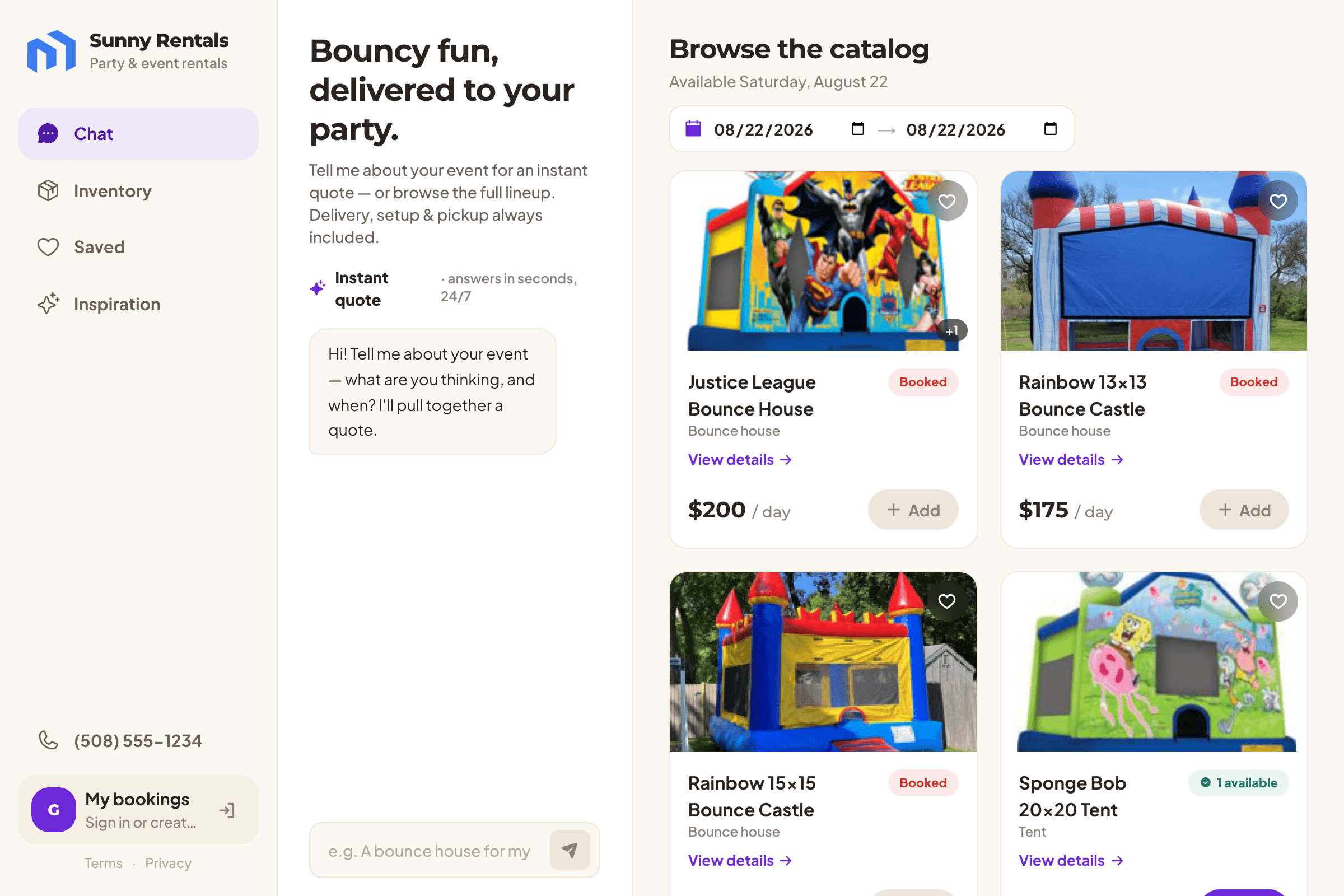
- Your logo, your color, your tagline, your about text. Customers see your business, and the assistant answers as your business.
- Availability they can trust
- Shoppers pick their dates and see what is genuinely bookable for that weekend, item by item, with photos, dimensions, and power requirements on every detail page.
- No account required
- Browse, get a quote, and check out as a guest. Signing in is optional and only buys extras: a saved list across every storefront and the ability to pick up an earlier conversation.
- Their own bookings, self-serve
- Customers get a passwordless portal showing their bookings across every operator they've rented from, what they've paid, what's still owed with a link to pay it, and the status of their agreement. That's a portion of your phone calls, gone.
- Or keep your own website
- Paste one line of script and the whole storefront, chat included, drops into the site you already have, locked to your domains. There's a public API if your developer would rather build the front end.
You will not double-book your last bounce house
Availability is real math on real stock, and the reservation itself is settled by the database.
Peak overlap, not a day count
Availability is computed across the whole rental window, so multi-day rentals, back-to-back weekends, and partial overlaps all resolve correctly instead of approximately.
The last unit can only be sold once
Two customers checking out for the same last unit at the same instant are serialized in the database. One gets the booking; the other is told immediately that it just sold out. Not usually fine, but enforced.
Dead carts let go
An abandoned checkout releases its hold automatically, so a customer who wandered off mid-payment doesn't quietly eat your Saturday.
Stock that means something
Available counts what you own minus what's already out, damaged, in repair, or waiting to be cleaned. So "available" means you can actually put it on a truck.
Phone and walk-in orders too
Build a quote yourself in a few taps, then either email a pay link or record it as booked for cash. Same calendar, same inventory, same math.
Get paid before the truck leaves
Deposits at checkout, the balance on delivery, and payouts straight to your own bank.
Your money, your account
Payments run through Stripe directly into your bank account. We never hold your funds and never see a card number.
Deposit now, balance later
Take a deposit at your percentage or the full amount up front, then collect the rest in a tap by card, or mark it paid in cash. Cash is recorded as a real transaction, so your totals are true rather than nearly true.
Priced the way you price
Sales tax split between rental and delivery, delivery charged flat, by zone, or by distance from a geocoded address, and refunds handled from the booking.
Discounts that run themselves
Codes with expiry dates, minimums, and usage caps, plus automatic promotions for slow weekdays and repeat customers. Only the best single discount applies, so nothing stacks by accident.
The day's route, in your driver's hand
Drop-offs and pick-ups in delivery-window order, on a phone, with one tap to everything.
One screen per day
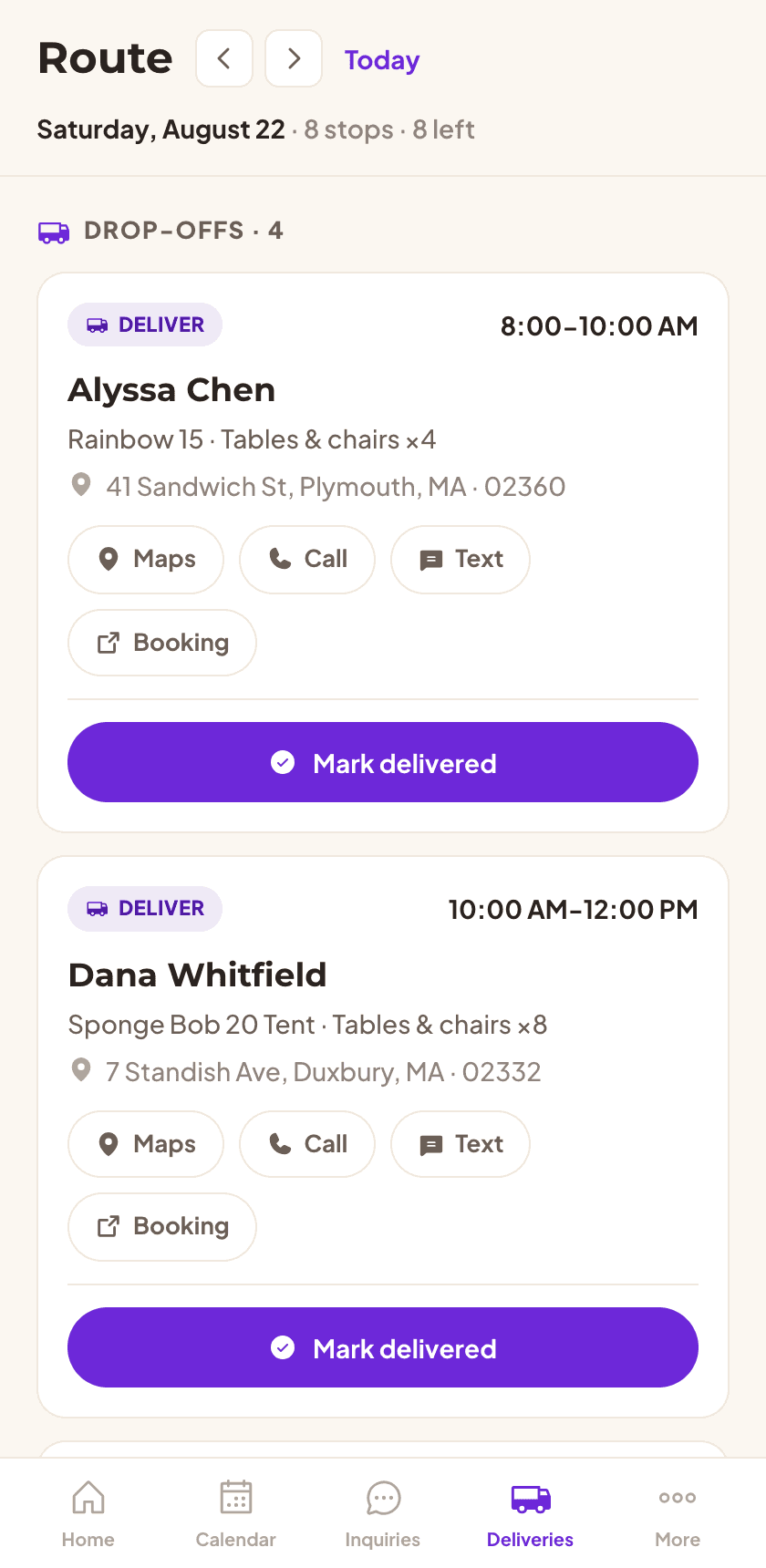
Every drop-off and pick-up in window order, each with the customer, the items, and the address. One tap opens maps, one tap calls or texts, one tap marks it delivered or picked up.
Marking a stop moves the business
Delivered on the route sheet is delivered on the booking, the calendar, and the dashboard. Nobody re-enters anything at the end of the day.
Tomorrow, before you leave
Flip to the next day to see what needs loading tonight.
Today, at a glance
A dashboard with the day's jobs, the month's revenue, discounts given, and anything that needs you, computed in your own timezone so today means today.
A team that chases money and paperwork overnight
Each agent has one job, runs nightly, shows its work, and switches off whenever you say.
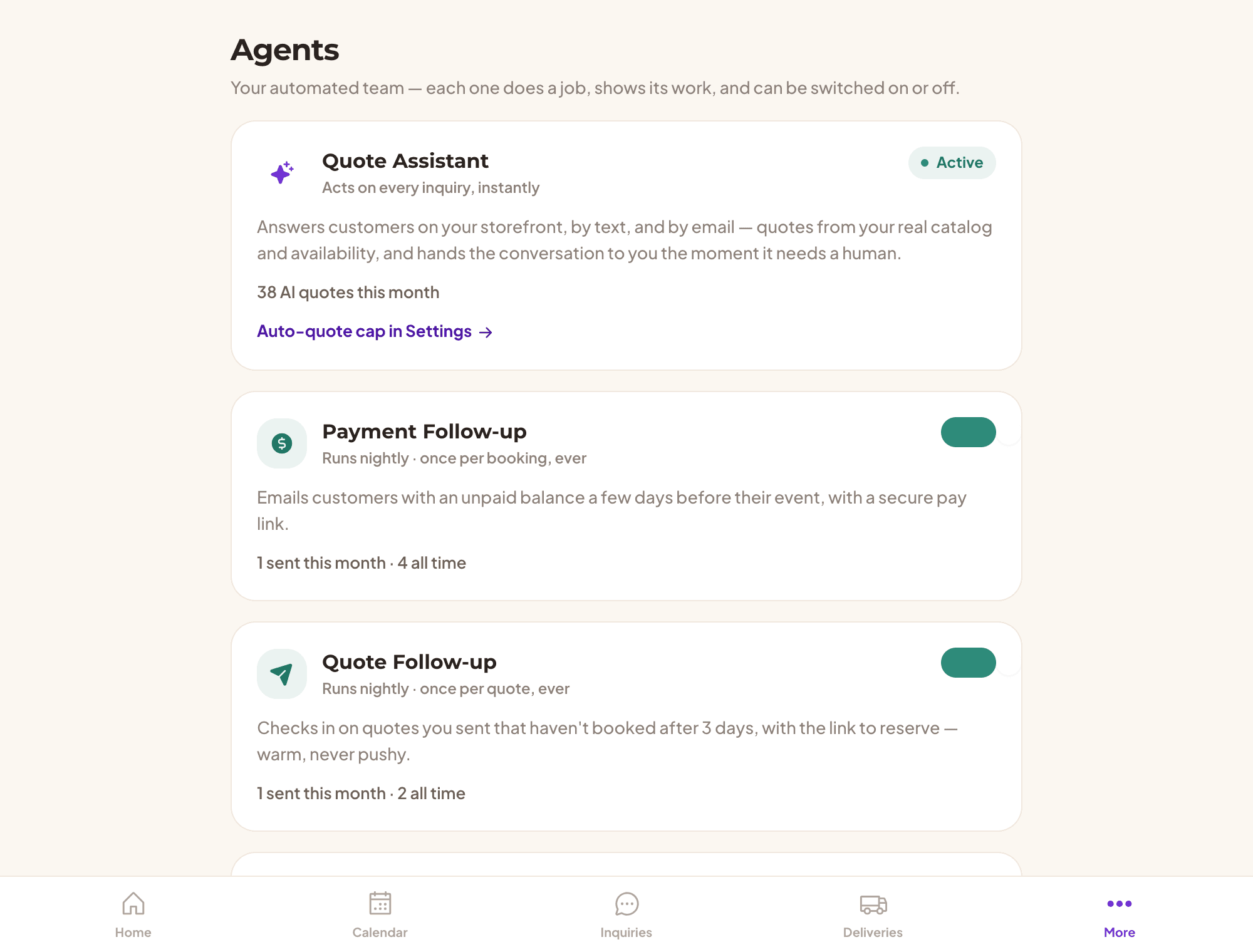
Payment Follow-up
Emails customers with an unpaid balance a few days before their event, with a secure pay link. The most direct revenue recovery in the product.
Quote Follow-up
Checks in on quotes you sent that haven't booked after three days, with the link to reserve. Warm, never pushy.
Compliance Watch
Warns you two weeks before your insurance, licenses, permits, or inspection records expire. Free on every plan, because a lapsed certificate isn't a billing question.
In your voice, on your terms
The agents speak the way you briefed the assistant, they're all off until you switch them on, and each one emails a given customer once ever. No loops, no nagging, and an activity log so you can see exactly what went out.
Every customer, every conversation, every dollar
The customer list you'd have built yourself, assembled from the work you're already doing.
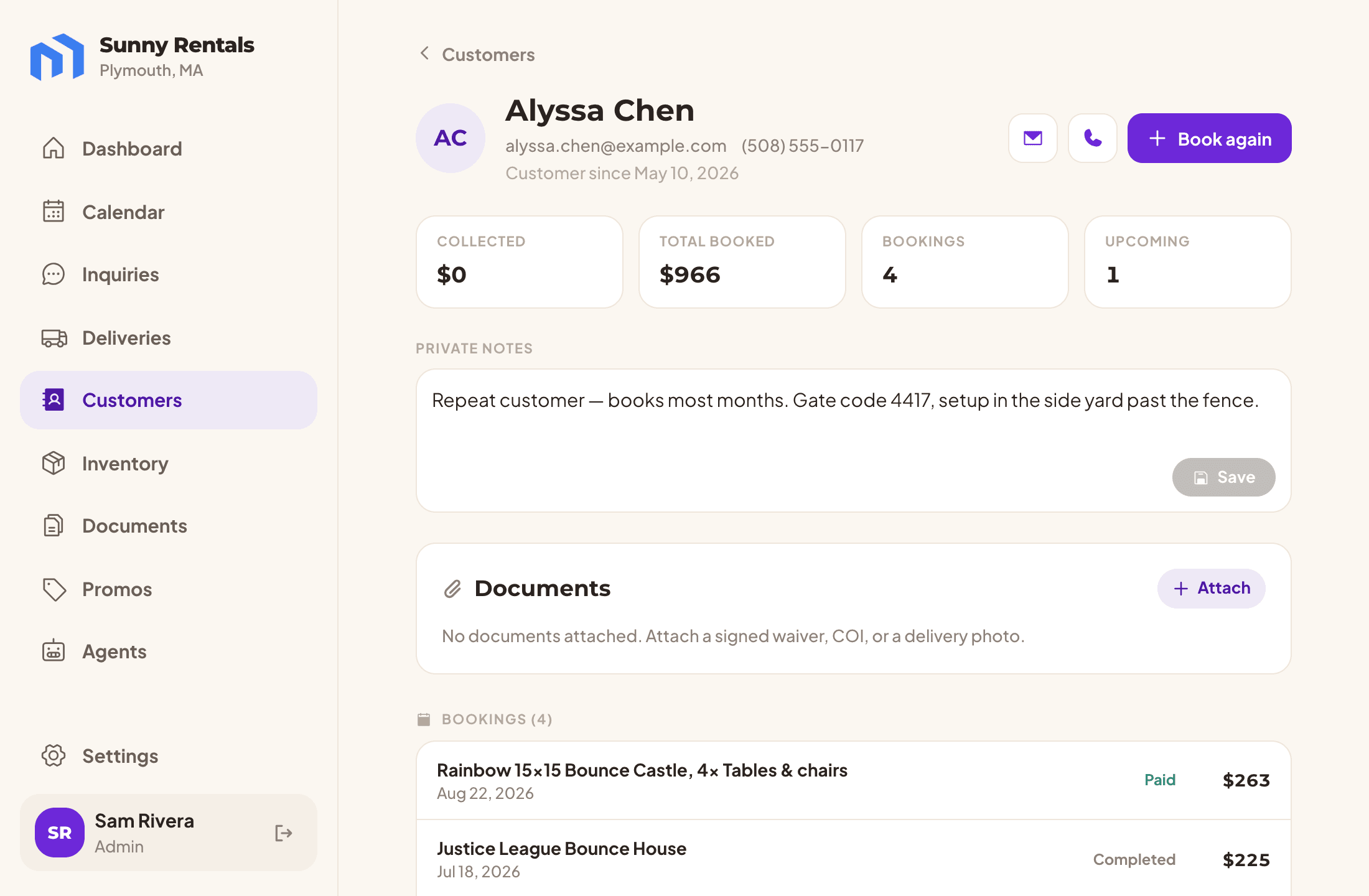
One record per person
Bookings, chats, texts, and storefront signups collapse into a single customer, deduplicated by email and phone, no matter how they first turned up.
What they've actually paid
Collected net of refunds, total booked, how many times, and what's coming up, with the real transaction history behind each booking including cash.
Leads you couldn't see before
Someone who saved an item or asked a question but never booked is now a person on a list, tagged with what they did. That's a follow-up call you didn't know you were owed.
Notes and one-tap everything
Private notes only your admins see, plus email, call, and book-again from the profile.
The binder in the truck, minus the binder
Insurance, licenses, inspections, and permits stored privately, with expiry dates that warn you.
Private by construction. Documents live in private storage and download through short-lived signed links. There is no public URL to leak, and no other operator can reach yours.
Expiry that finds you. Dated certificates raise a dashboard warning and an email two weeks out, so a lapsed COI is something you renewed rather than something a venue discovered.
Attached where it matters. Pin a document to a specific booking or customer, so the certificate a venue asks for is filed against the job it belongs to.
Policies written once. Your cancellation and damage terms are entered a single time and rendered everywhere they matter: at checkout before payment, in the quote and confirmation emails, and in the agreement.
What the library holds
- Insurance certificate
- Business license
- Safety inspection
- W-9
- Permit
- Waiver template
- Rental agreement
Insurance, licenses, inspections, and permits are the four we watch for expiry.
Bring your crew in, without handing over the books
Employees can run the day and take payments. Only admins can move money back out.
Money in, not money out
An employee can collect a balance and take cash on the doorstep, but cannot refund or cancel. Per-booking totals stay visible so they can do the job; your revenue figures stay yours.
The route sheet in your driver's hand
A driver seat is a login: the day's route on their phone, one-tap maps and calls, and mark-delivered that updates the whole business. No screenshots of addresses over text.
Invite, change, remove
Add a crew member by email, change their role, remove them when the season ends. The last admin can't lock themselves out.
Set up in an afternoon
A nine-step checklist walks you from an empty account to a live storefront, ticking itself off as you work: service area, rentals, payouts, documents, follow-ups, policies, branding, briefing the assistant, and a test drive of your own storefront. No onboarding call, no installer.
More than one business
One login can belong to several operations and switch between them, which matters if you run two brands or help a partner run theirs.
The nine steps
- Set your service area
- Add your rentals
- Get paid
- Upload your compliance documents
- Put your follow-up agents to work
- Write your customer policies
- Brand your storefront
- Brief your assistant
- Take it for a test drive
Built like it's holding your customers' data
Because it is. Isolation at the database, payments through Stripe, and your renters left alone.
Isolated at the database, not just the code. Your records are fenced off by the database itself, so a bug in the application can't hand another operator your customer list. Belt and braces, verified by tests that run on every deploy.
We never touch a card. Checkout is hosted by Stripe and e-signatures by a dedicated provider. Card numbers never reach our servers.
Your customers are yours. We process renter data on your behalf and don't market to them. No cross-selling your customer list, ever.
The money paths are tested. Checkout, reservations, and payment webhooks are idempotent and covered by an automated suite that gates every deploy, so a retried payment can't double-charge or double-book.
The whole list, plan by plan
All 111 capabilities, grouped and compared across the three plans.
Three plans, one of them free
Start free and upgrade when you're booking more than you can count.
Try it out
- Up to 20 quotes / month
- AI quote assistant
- Storefront + checkout
For a solo operator
- Unlimited quotes
- 0% platform fee on bookings
- E-signed rental agreements
- Automated follow-ups (quotes, balances, contracts)
For a growing team
- Everything in Solo
- Team members & driver logins
- Priority support
Every plan pays standard card processing (2.9% + 30¢ per charge). Free-plan bookings carry a 2% platform fee; Solo and Growing pay none.
Paid plans include a 14-day free trial. No credit card on Free.
Questions we get asked
Can I change a booking after it's made?
Not yet. Once a booking is made its items and dates are locked, because they hold real inventory and carry a payment against a specific amount, so a change today means cancelling and rebooking. Editing an existing order is on the roadmap and we would rather say that than pretend otherwise.
What happens when the assistant can't price something?
It stops quoting and hands the conversation to you. The customer is told a human is picking it up, the request lands in your inbox flagged as needing you, and you get an alert. You can then build the quote yourself in a few taps and email it, pre-filled from what the customer already said.
Does it work on a phone?
The parts you use in the field are built phone-first: the daily route sheet, the inbox, marking a stop delivered, collecting a balance on the doorstep. Your customers' storefront is mobile-first too, since most of them will book from a phone.
Who owns my customer data?
You do. We process it on your behalf to run your storefront and bookings, and we don't market to your renters or share your customer list. You can see every customer record in the app, and your notes stay private to your team.
How long does setup take?
An afternoon. A nine-step checklist walks you from an empty account to a live storefront and ticks itself off as you go. The three things that matter first are your service area, a few rentals, and connecting Stripe so you can take money.
Put the whole thing to work this weekend
Your catalog, your storefront, and an assistant that answers while you're on a job.
Request early access